As some of you know, I’ve been working on CM 2012 for a while now, and establishing a hierarchy. One of the unfortunate tasks with this job has been boundary creation. Finally after a longer period than it should have taken I went to build a tool to create site boundaries for me out of a csv, similar to tools with SCCM 2007.
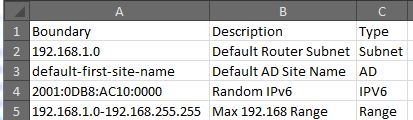
I found the sms_boundary class hadn’t changed (outside of an obsolete boundaryflag property) so I decided to test it out with powershell as a one liner, and it worked great. I did a bit more research and stumbled across something already written by MVP Kaido Järvemets from Estonia, and enjoyed his minimalistic script for it so I followed his methodology (mostly) and ended up with this script that reads from a boundaries.csv file
$sitecode = "ABC"
$siteserver = "mysiteserver"
$boundarylist = Import-Csv '.\boundaries.csv'

foreach($Item in $boundarylist)
{Switch($item.'type')
	{"Subnet" 	{$Type = 0}
	 "AD" 		{$Type = 1}
     "IPv6" 	{$Type = 2}
     "Range" 	{$Type = 3}}
$arrValues = @{DisplayName = $Item.description; BoundaryType = $Type; `
Value = $Item.boundary}
Set-WmiInstance -Namespace "Root\SMS\Site_$sitecode" -Class SMS_Boundary `
-Arguments $arrValues -ComputerName $siteserver}
Not to take credit for other peoples work, especially since this is a hacked up version of his original which can be found here.